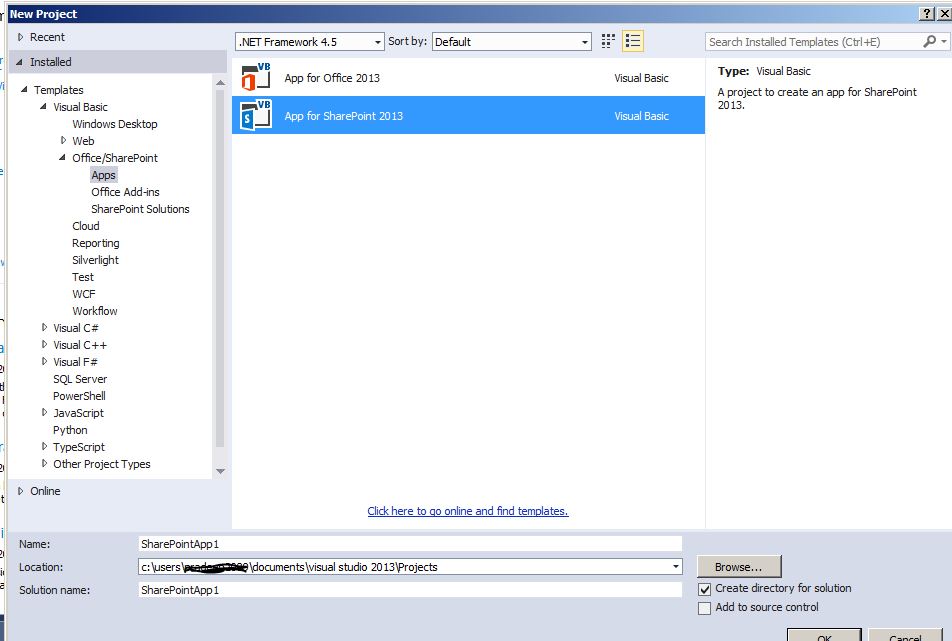
In the next window, In the hosting type I had selected SharePoint Hosted App.

 After the project is created, Project structure looks like as show on right.
There are several parts in the projects such as Pages, Scripts, List Instance, Images.
I had created list called 'CountryInfo' that would contain sample country data,
In the Pages section I had added CRUD.aspx. It is the main page for the application.
In the Scripts folder I had various javascript files such as app.js, crud.js, ListManager.js, ListItemManager.js.
CRUD.aspx - The file contains DIV that would display the results of various operations and also there are 4 buttons for CRUD operations for performming respective task. The references for below js libraries are added in PlaceHolderAdditionalPageHead section.
CRUD.js - The file contains logic for JSOM CRUD operations.
ListManager.js - The file contains logic to fetch or create list.
ListItemManager.js - The file contains logic for updating, creating list item.
App.js - The files contains logic to log and display the error to div. CRUD.aspx
Creating SharePoint List 'CountryInfo'
Right on project and then add new item to create a new list.

I had created new columns to the 'CountryInfo' list and added sample data. Below is element.xml file for SharePoint list.

Next, CRUD.aspx has DIV and 4 radio buttons. I had added all the js references before we start working on each of the js files in PlaceHolderAdditionalPageHead section. Below is the complete designer code for CRUD.aspx

In CRUD.js Instead of polluting the global namespace I am creating/using namespace called JSOM(window.JSOM || {} specifically says that if there is namespace with JSOM we are going to use it or else it creates a new one for us ) and also we create class under it called JSOM.Crud. Each of the buttons are assigned with click handlers.

Reading SharePoint list data using JSOM in SharePoint Hosted Apps:
When the first button 'Read' is clicked below code queries SharePoint list and displays results on SharePoint Hosted App.

Result

Inserting SharePoint list data using JSOM in SharePoint Hosted Apps
In CRUD.js on button click insercall is executed and below is source code. Before inserting any item it initially checks for whether valid list is present or else it will create a list. This process is performed in separate JS file called ListManager.Js
Since 'executeQueryAsync' is async process which executes the statements some time in future. In our case based on result of fetch operation in ListManager.js we have to execute further statement in CRUD.js so I had created deffered object and returned the promise. Based on the promise success/failure calls are executed in in CRUD.js
CRUD.js:

ListManager.js

ListItemManager.js

Result:
 Updating SharePoint list data using JSOM in SharePoint Hosted Apps:
On update button click, I had called update function that takes list id to update the data into SharePoint list. I had used ListItemManager.js file to update the data provided from crud.js file. Upon return promise I am executing the further success and failure functions.
crud.js

ListItemManager.js

Results:
Before and after update updating ID with 2


Deleting SharePoint list data using JSOM in SharePoint Hosted Apps:
When delete button is clicked app prompts for list item id to be deleted. Below is code.

Result

 App.js has below code for logging the output to DIV element.

Complete Source Code: Link
I had created new columns to the 'CountryInfo' list and added sample data. Below is element.xml file for SharePoint list.
In CRUD.js Instead of polluting the global namespace I am creating/using namespace called JSOM(window.JSOM || {} specifically says that if there is namespace with JSOM we are going to use it or else it creates a new one for us ) and also we create class under it called JSOM.Crud. Each of the buttons are assigned with click handlers.
Reading SharePoint list data using JSOM in SharePoint Hosted Apps:
When the first button 'Read' is clicked below code queries SharePoint list and displays results on SharePoint Hosted App.
Result
Inserting SharePoint list data using JSOM in SharePoint Hosted Apps
In CRUD.js on button click insercall is executed and below is source code. Before inserting any item it initially checks for whether valid list is present or else it will create a list. This process is performed in separate JS file called ListManager.Js
Since 'executeQueryAsync' is async process which executes the statements some time in future. In our case based on result of fetch operation in ListManager.js we have to execute further statement in CRUD.js so I had created deffered object and returned the promise. Based on the promise success/failure calls are executed in in CRUD.js
CRUD.js:
ListManager.js
ListItemManager.js
Result:
On update button click, I had called update function that takes list id to update the data into SharePoint list. I had used ListItemManager.js file to update the data provided from crud.js file. Upon return promise I am executing the further success and failure functions.
crud.js
ListItemManager.js
Results:
Before and after update updating ID with 2
When delete button is clicked app prompts for list item id to be deleted. Below is code.
Result
Complete Source Code: Link


